VidScreen 显示屏
(vid-screen)=
游戏屏幕 VidScreen
VidScreen 是一个可编程的 64x64 屏幕,您可以使用箭头键“a”和“b”与其进行交互,需与编程代码协作完成游戏编写。
脚本属性
::::{tab-set} :::{tab-item} feature.screen
feature.screen
This is a 64 wide x 64 high x 3 bytes (r, g, b) array that you can use to draw onto the screen.
feature.screenWidth
feature.screenHeight ::: ::::
Events
As well as the events shared between all features, vidscreens have three unique events.
Keys event: on('keys', (event) => {})
This event triggers whenever a key is pressed or released. The available keys are the arrow keys, A, and B.
Frame event: on('frame', (event) => {})
This event triggers on every frame (30 fps).
Start event: on('start', (event) => {})
This event triggers when the player clicks on the vidscreen to activate it.
VidScreen example: Breakout
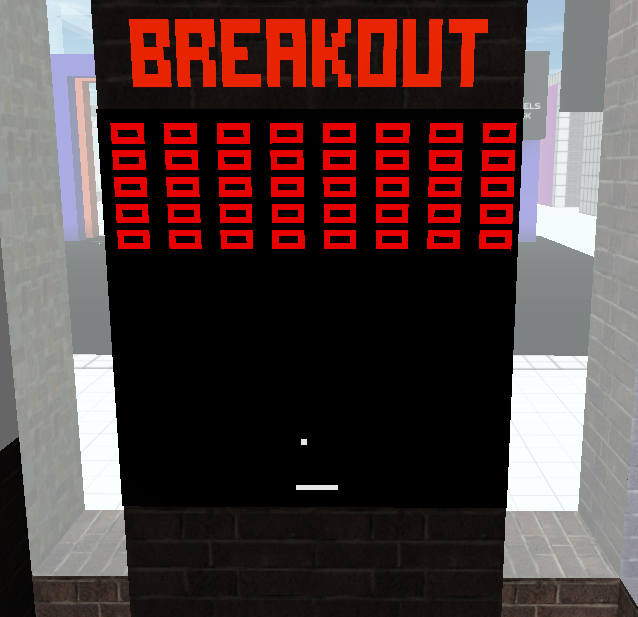
This is a simple version of the arcade game Breakout, written for a Cryptovoxels vidscreen. Full Source code here. You have control over a paddle at the bottom of the screen, which can move left and right. There is an array of blocks at the top of the screen. A ball bounces off of the paddle and walls of the game, and any time it hits a block it not only bounces off but also destroys the block. If the ball hits the bottom of the screen, the game resets.
let ball, paddle, frame, blocks

feature.on('keys', e => {
  if (e.keys.left) {
    paddle.moveLeft()
  } else if (e.keys.right) {
    paddle.moveRight()
  }
})

feature.on('start', e => {
  reset()
})

feature.on('frame', e => {
  frame += 1
  update()
  draw()
})

function update() {
  ball.update()
}

function draw() {
  feature.screen.fill(0)

  ball.draw()
  paddle.draw()
  for (j = 0; j < blocks.length; j ++) {
    blocks[j].draw()
  }
}

function reset() {
  ball = new Ball(Math.round(Math.random() * 64), 32)
  paddle = new Paddle(29, 60, 6)
  frame = 0
  blocks = []
  for (y = 0; y < 5; y ++) {
    for (z = 0; z < 8; z ++) {
      blocks.push(new Block(Math.floor(feature.screenWidth / 8 * z + 2), y * 4 + 2, 5, 3))
    }
  }
  draw()
}

// classes

class Ball {
  constructor(x, y) {
    this.xPos = x
    this.yPos = y

    this.xVel = Math.random() > 0.5 ? 1 : -1
    this.yVel = 1
  }

  update() {
    if (frame % 2 != 0) {
      return
    }

    // wall collision detection

    if (this.xPos + this.xVel > 63 || this.xPos + this.xVel < 0) {
      this.xVel *= -1
    }
    if (this.yPos + this.yVel < 0) {
      this.yVel *= -1
    }
    if (this.yPos + this.yVel > 63) {
      reset()
    }

    // paddle collision detection

    if ((this.yPos + this.yVel == paddle.yPos)) {
      let nextX = this.xPos + this.xVel
      if (nextX >= paddle.xPos && nextX <= paddle.xPos + paddle.width) {
        this.yVel *= -1
      }
    }

    // block collision detection

    for (let i = 0; i < blocks.length; i ++) {
      let block = blocks[i]
      let nextX = this.xPos + this.xVel
      let nextY = this.yPos + this.yVel

      if (nextX >= block.x && nextX < block.x + block.width && nextY >= block.y && nextY < block.y + block.height) {
        if (this.xPos < block.x || this.xPos > block.x + block.width - 1) {
          this.xVel *= -1
        }
        if (this.yPos < block.y || this.yPos > block.y + block.height - 1) {
          this.yVel *= -1
        }

        blocks.splice(i, 1)
        break
      }
    }

    // update position

    this.xPos += this.xVel
    this.yPos += this.yVel
  }

  draw() {
    for (let i = 0; i < 3; i ++) {
      feature.screen[this.yPos * feature.screenWidth * 3 + this.xPos * 3 + i] = 255
    }
  }
}

class Paddle {
  constructor(x, y, w) {
    this.xPos = x
    this.yPos = y
    this.width = w
  }

  draw() {
    for (let i = this.yPos * feature.screenWidth * 3 + this.xPos * 3; i < this.yPos * feature.screenWidth * 3 + (this.xPos + this.width) * 3 + 3; i ++) {
      feature.screen[i] = 255
    }
  }

  moveLeft() {
    if (this.xPos > 0) {
      this.xPos -= 1
      draw()
    }
  }

  moveRight() {
    if (this.xPos + this.width < 63) {
      this.xPos += 1
      draw()
    }
  }
}

class Block {
  constructor(x, y, w, h) {
    this.x = x
    this.y = y
    this.width = w
    this.height = h
  }

  draw() {
    // horizontal lines
    for (let i = 0; i < this.width; i++) {
      feature.screen[this.y * feature.screenWidth * 3 + (this.x + i) * 3] = 255
      feature.screen[(this.y + this.height - 1) * feature.screenWidth * 3 + (this.x + i) * 3] = 255
    }

    // vertical lines
    for (let i = 0; i < this.height; i++) {
      feature.screen[(this.y + i) * feature.screenWidth * 3 + this.x * 3] = 255
      feature.screen[(this.y + i) * feature.screenWidth * 3 + (this.x + this.width - 1) * 3] = 255
    }
  }
}
Let's demonstrate how the vidscreen's unique events and attributes are used.
feature.on('keys', e => {
    if (e.keys.left) {
        paddle.moveLeft()
    } else if (e.keys.right) {
        paddle.moveRight()
    }
})
Whenever a key press is detected, we move the paddle left or right if one of the left or right arrow keys are pressed.
feature.on('start', e => {
    reset()
})
When the vid screen is opened, reset() is called, which sets up the game from the start.
feature.on('frame', e => {
    frame += 1
    update()
    draw()
})
This is the main game loop - on every frame, we update the position of the ball, and then draw everything on the screen.
Let's take a closer look at the draw() method.
function draw() {
    feature.screen.fill(0)

    ball.draw()
    paddle.draw()
    for (j = 0; j < blocks.length; j ++) {
        blocks[j].draw()
    }
}
Here we are drawing into feature.screen, first filling it with a black background, then drawing the objects on top.
class Ball {
    draw() {
        for (let i = 0; i < 3; i ++) {
            feature.screen[this.yPos * feature.screenWidth * 3 + this.xPos * 3 + i] = 255
        }
    }
}
The ball is drawn as a single white pixel. This means that the three bytes for R, G, and B, all have to be set to 255 on that pixel. This code snippet demonstrates filling in a single pixel at (this.xPos, this.yPos).